TK1971 Casino Sign In — BD Account

Logging in to TK1971 gives you instant access to your balance, betting history, active bonuses, deposit and withdrawal forms, and VIP status. This page covers every login method available - phone number, Google, Telegram - plus password recovery, 2FA setup, and what to do when something goes wrong. Whether you are signing in from a browser or the Android app, the process takes under 30 seconds once you know the steps.

What You Get After Logging In

Before going through the steps, it is worth knowing exactly what your TK1971 account unlocks. Once signed in, you can see your BDT balance, open the deposit form (minimum 100 BDT via bKash or Nagad), request withdrawals (100-25,000 BDT per transaction), check your VIP level from VIP0 to VIP31, claim daily bonuses in the Reward Center, and track your betting history across all categories - slots, live casino, sports, and crash games like Aviator.

Without being logged in, none of these features are accessible. The login screen is the single entry point to everything.

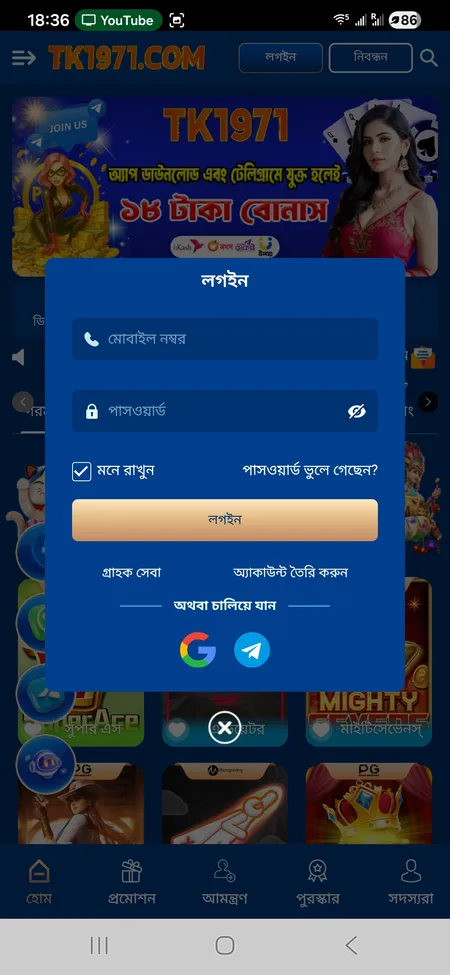
TK1971 login form with phone and password fields

The login popup shows fields for Mobile Number and Password, a Remember Me checkbox, Forgot Password link, and social login options via Google and Telegram.

Where to Find the Login Button

On the TK1971 website (tk1971game.com or tk1971.org), the login button labeled 'লগইন' (Login) sits in the top-right corner next to the Registration button. On mobile, the same two buttons appear in the header bar. Inside the side menu (hamburger icon), there is no separate login link - the header buttons are the main entry points.

In the Android app, the Login and Registration buttons appear immediately on the home screen before you authenticate. The layout mirrors the web version, so existing users find it familiar from day one.

Open TK1971 and Sign In

Login Methods Available on TK1971

TK1971 offers three ways to authenticate:

Method Details
Mobile number + password Standard login using your Bangladesh phone number and the password set at registration
Google account One-tap sign-in via your Google profile - no password entry required
Telegram account Direct authentication through Telegram - useful if you already use the platform's Telegram channel

The phone number method is the most common among Bangladeshi players. Google and Telegram logins are faster for users who already have those apps open on their device.

Step-by-Step: Signing In With Phone Number

Follow these steps to log in using your registered mobile number:

  1. Open tk1971game.com or the TK1971 Android app.
  2. Tap the Login (লগইন) button in the top-right corner.
  3. Enter your Bangladesh mobile number in the 'মোবাইল নম্বর' field.
  4. Enter your password in the 'পাসওয়ার্ড' field.
  5. Tick 'মনে রাখুন' (Remember me) if you want the session saved on this device.
  6. Tap the 'লগইন' button to confirm.

If your credentials are correct, you land directly on the home screen with your balance visible. The whole process takes about 15 seconds on a stable mobile connection.

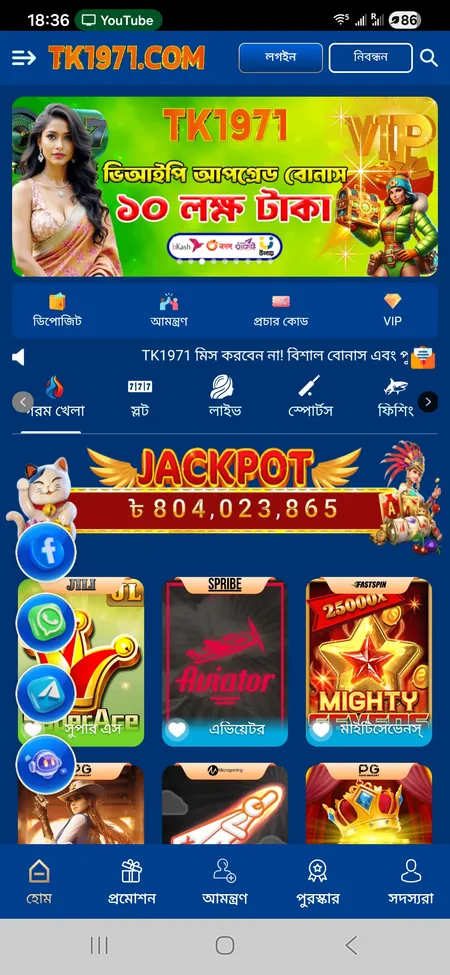
TK1971 home screen after successful login

After login, the home screen shows your BDT balance, VIP level, deposit shortcut, active promotions and the game categories bar.

Go to TK1971

Logging In Through the Mobile App

The TK1971 app is not available on Google Play - you download the APK directly from the official site. After installation, the app stores your session locally, which means you stay logged in between visits unless you manually log out or clear the app data.

The app supports biometric authentication (fingerprint and Face ID), so after the first password login you can use your fingerprint for all subsequent sessions. Push notifications for match updates and bonus claims are only active when you are logged in through the app.

One account works across both the website and the app simultaneously. If you log in on a second device, the first session remains active unless the platform's anti-fraud system flags unusual activity.

The TK1971 app uses SSL encryption and local session tokens. Your password is never stored in plain text on the device.

Recovering a Lost Password

If you forget your password, TK1971 does not offer a self-service reset link in the usual sense. The recovery process goes through 24/7 customer support. Here is what to do:

  • Open the login popup and tap 'পাসওয়ার্ড ভুলে গেছেন?' (Forgot password?)
  • You will be redirected to the support contact options
  • Contact the team via Online Chat, Telegram, or WhatsApp with your registered mobile number and Member ID
  • Support verifies your identity and resets access within 2-5 minutes according to the platform's stated response time

For this reason, it is important to use a mobile number you actively control when registering. If you lose access to that number, identity verification becomes harder.

Contact Support on TK1971

Two-Factor Authentication and Account Security

TK1971 recommends enabling 2FA as an additional layer of account protection. Once active, every login from a new device or browser triggers a verification step before granting access.

Key security features on the platform:

  • SSL encryption on all login and transaction pages
  • Session monitoring - unusual login locations or IP changes can trigger review
  • Transaction password (লেনদেন পাসওয়ার্ড) required separately for withdrawals, independent of the login password
  • Anti-fraud rules: one account per player per phone number, IP address, and payment method; duplicate accounts are flagged automatically

The transaction password is a separate credential from your login password. Keep both different from each other and from any passwords you use on other services.

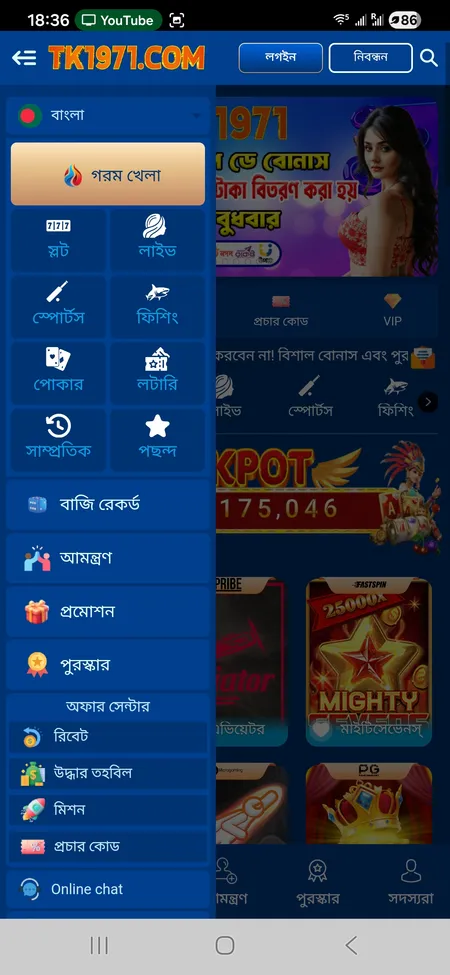
TK1971 side menu after login

Login Password

Used only to access your account. Can be saved via the Remember Me option on trusted devices. Required every time you open a new session on an unfamiliar device.

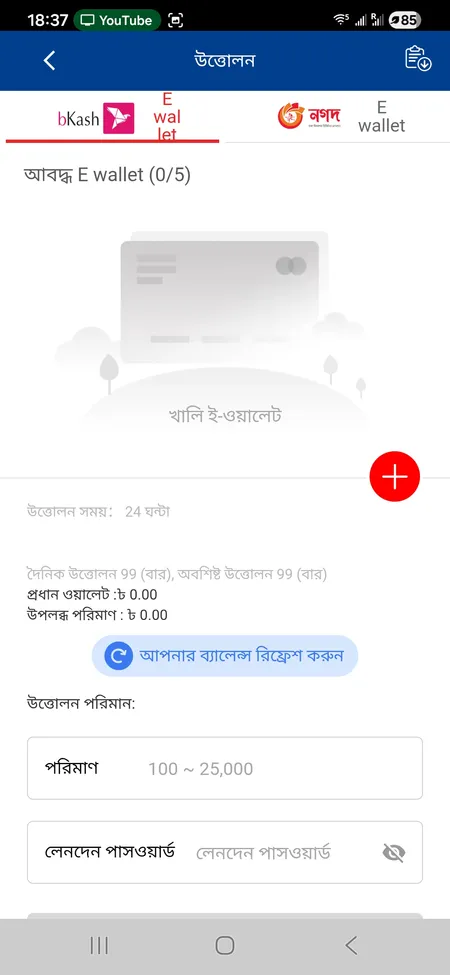
TK1971 withdrawal form with transaction password field

Transaction Password

A separate PIN required before every withdrawal. Adds a second verification layer so that even if someone accesses your session, they cannot move funds without this code.

Common Login Problems and Quick Fixes

Problem Likely Cause Fix
'Wrong password' error Typo or outdated password Use Forgot Password or contact support
Login button unresponsive Slow connection or outdated app Switch to mobile data, update the APK
Account blocked Multiple failed attempts or anti-fraud trigger Contact support via Telegram or live chat
Session expires immediately Browser cookies disabled Enable cookies or switch to the app
Social login fails Google or Telegram app not updated Update the respective app and retry

If none of these steps resolve the issue, reach out to TK1971 support at [email protected] or through the live chat available inside the app and website. Response time is stated as 2-5 minutes around the clock.

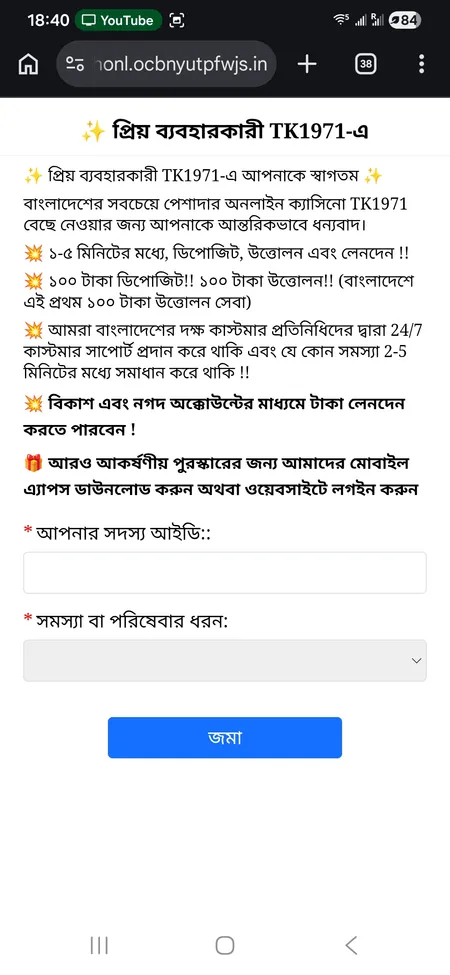
TK1971 support page with member ID and problem type form

The support form asks for your Member ID and the type of issue. You can also reach the team via Telegram and WhatsApp for faster response.

Get Help on TK1971

What Happens After You Log In

Once authenticated, the bottom navigation bar gives you five sections: Home, Promotion, Invitation, Reward (with notification badge), and Members. From the Members tab you can view your profile, check VIP level, update your avatar, and access the referral program.

Explore the full TK1971 game catalog from the home screen - slots from JILI and PG, live tables from Evolution and Ezugi, sports markets including cricket and e-sports, and crash games like Aviator are all reachable within one tap after login.

The Reward Center is particularly worth checking immediately after login. Daily sign-in bonuses, active missions, and the Recovery Fund are all claimable from that single screen.

For players who want to place bets, the TK1971 betting section opens directly from the Sports tab in the main navigation after you are signed in.

TK1971 enforces a one-account policy. Creating multiple accounts from the same phone number, IP address, or payment method is treated as fraud and can lead to account suspension and balance forfeiture.

Login FAQ

Can I log in without a phone number?

You can use Google or Telegram to authenticate without entering a phone number directly. However, your account was created with a mobile number, and support verification for password recovery still uses that number.

Why does TK1971 ask for a transaction password during withdrawal?

The transaction password is separate from your login password. It acts as a second security layer to prevent unauthorized fund movements even if your login session is compromised.

How long does a login session stay active?

With Remember Me enabled, your session persists until you manually log out or clear your browser or app data. Without it, inactivity may end the session after a period.

What should I do if my account is locked?

Contact TK1971 support immediately via Telegram, WhatsApp, or the live chat. Provide your Member ID and registered mobile number. The team targets a 2-5 minute response time.

Can I be logged in on two devices at the same time?

Yes, one TK1971 account can be active on the website and the app simultaneously. However, unusual multi-device activity may trigger a security review.

Is the app login more secure than the browser?

The app adds biometric authentication (fingerprint, Face ID) on top of the standard password, which the browser version does not offer. For security, the app is the recommended method.

What if I registered with a phone number I no longer have access to?

Contact support with as much account information as possible (Member ID, name used at registration, previous transaction details). Recovery without the original number requires manual identity verification.

Does TK1971 send login notifications?

The app sends push notifications including security alerts. The platform also monitors login patterns and may flag logins from unfamiliar devices or IP addresses.

Ready to sign in? Open TK1971, tap Login, and access your full account in under 30 seconds.